

Everything the crab can do
A plain tour of every feature in Narad today, from sending your first message to copying a topic across clusters. What each one is for, how it works in a sentence or two, and which earlier post tells its story.
I’ve written about Narad for months now, but always one piece at a time: the design, the 1.0 release, rebalancing, benchmarks, Narad 3. Nowhere does it say everything Narad can do in one place.
This post fixes that. It’s a tour, not a manual. For each feature: what it’s for, how it works in a sentence or two, and a link if there’s a longer story behind it. The docs have all the details.
What Narad is
Narad is a message broker in one Go binary. Your apps send messages to it over plain HTTP, other apps take them out, do the work, and say “done”. It’s closer to Amazon SQS than to Kafka: simple to use, simple to run, and it keeps your messages safe on disk.
It makes two promises:
- A
202means your message is on disk. It survives any crash or power cut from then on. - Every message gets delivered until someone says it’s done. Sometimes that means it’s delivered twice, so your code should handle repeats.
And it’s upfront about two things it doesn’t promise:
- Order. There’s no ordering guarantee. If order matters, put a sequence number in the message.
- More than one copy. Each partition is stored once. Losing a server’s disk loses what’s on it, unless you keep a replica or snapshots (both covered below).
The life of a message
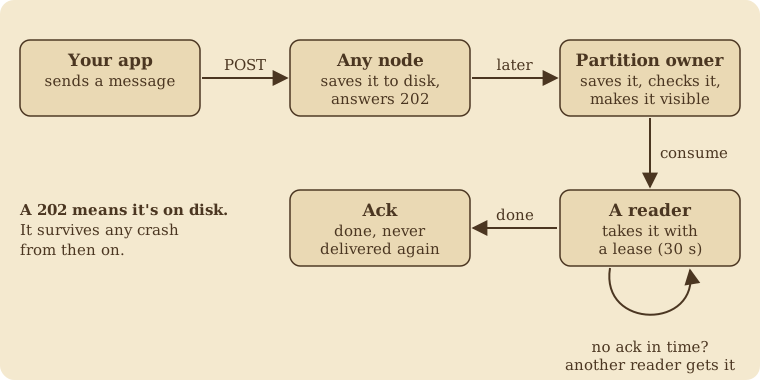
- Your app sends a message to any server. That server saves it to its own disk straight away and answers
202. - In the background, it passes the message to the server that owns that part of the topic. The owner saves it again, reads it back to check it, and only then lets readers see it.
- A reader takes the message with a lease: 30 seconds by default to finish the work.
- The reader acks it, and it’s gone for good. If the lease runs out first, another reader gets it.
The produce path and consume path pages explain this in depth.
Sending and reading
Topics, partitions and keys. A topic is a named stream of messages, like orders. It’s split into partitions so the work spreads across servers. If you give a message a key, every message with that key goes to the same partition.
Sending. One HTTP POST per message, with the message as the body, stored byte for byte. Or send up to 1,000 messages in one batch (up to 16 MiB, optionally compressed with zstd or gzip). Batches are much faster; see Narad 3.
Reading. Ask for a message and wait (a “long poll”) until one arrives. Then you can:
- ack it: done.
- extend the lease: “I need more time”.
- nack it: “I can’t do this one, give it to someone else now”.
You can also read and ack up to 100 at a time.
Replay. Read old messages from any point in a partition’s history without taking leases, so the readers doing real work never notice. Good for debugging, rebuilding a database, or checking what happened.
Schemas. Give a topic a JSON Schema, and Narad rejects any message that doesn’t match, with a 400 that names the bad field. Bad data never reaches the log, no matter which language or team sent it. You can change the schema over time, and Narad checks each change won’t break existing readers.
One topic, many copies: child topics
This is Narad’s most flexible feature. You attach child topics to a parent topic, and every message sent to the parent gets copied into each child. Your apps keep writing to the parent and don’t need to know the children exist.
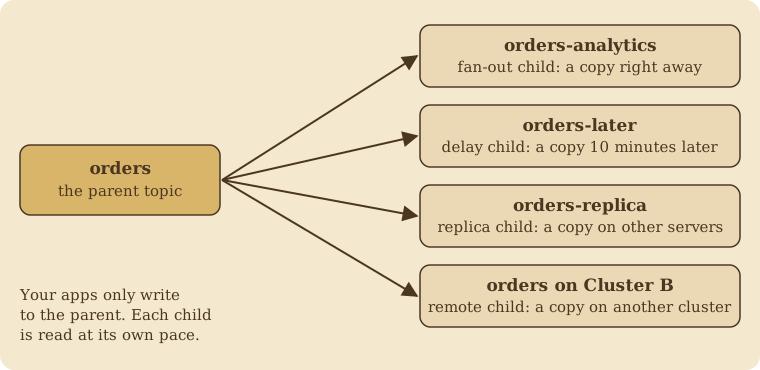
There are four kinds:
- Fan-out child: a copy right away. Analytics, billing and search can each read every order at their own pace.
- Delay child: a copy after a fixed delay, like 10 minutes. Handy for “check again later” jobs.
- Replica child: a copy placed on different servers from the parent. It’s Narad’s answer to “what if a disk dies?” (the 1.0 post tells how that one came about).
- Remote child: a copy on a whole other Narad cluster, for moving a busy topic or keeping a disaster-recovery copy in another region. New in Narad 3; here’s how it was built.
Each copy is saved before the copier moves on, so a crash can repeat a message but never skip one.
Retries and dead letters, without a retry engine
Narad has no built-in retry system and no built-in dead-letter queue. That’s on purpose. You build the policy you want from topics, leases and acks, and it lives in your code where you can read and change it.
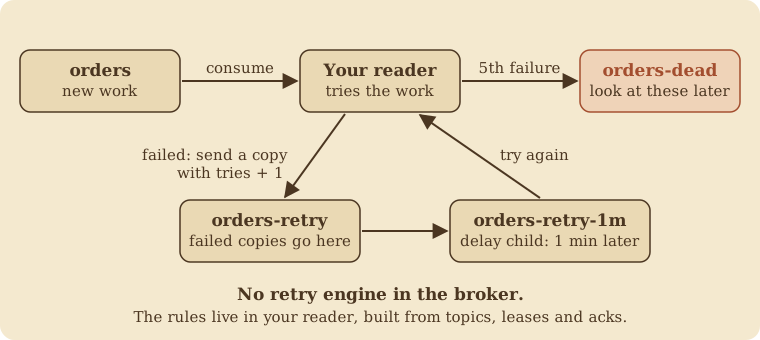
A failed message gets copied to a retry topic with its try count bumped. A delay child hands it back a minute later. After five tries it goes to a “dead” topic for a human to look at. The retries guide has the full recipe.
Who can do what
Users and grants. Give each service its own user and only the permissions it needs. There are four actions (produce, consume, create, admin), and each can apply to a topic name or a prefix like orders-*. Whoever creates a topic owns it. Every change to users and topics goes into an audit log.
On the wire:
- Apps log in with a username and password over HTTP. HTTPS for apps is handled by your load balancer or ingress.
- Servers talking to each other must prove they know a shared cluster secret on every connection.
- The control plane (Raft) supports mutual TLS, with a guide for rotating the certificates.
- Requests that change things need a special header, so a web page in someone’s browser can’t trick Narad into acting for them.
Running a cluster
Kubernetes and Helm. A Helm chart installs a three-node cluster, with sensible probes and a network policy switched on by default.
Adding servers. New servers join a running cluster on their own.
Rebalancing and removing servers. Narad can move a partition, data and all, from one server to another without losing a message, and empty a server before you remove it. That was the whole of Narad 2.0: The crab molts.
Upgrades. Rolling upgrades, one server at a time, with every release note saying exactly how to roll back and when you can’t.
Backups. Keep a replica child, take volume snapshots, or both.
Watching it
- Prometheus metrics for everything: throughput, latency, backlog, disk, and how far behind each child topic is.
- Ready-made alerts for the things that really go wrong, such as a disk about to fill up, a child topic falling behind, a cluster with no leader, or a remote copy that’s stuck.
- A troubleshooting guide that starts from what you’re seeing (a status code, a metric, a log line) and goes to the cause and the fix.
- Profiling (pprof) built in, for when you need to dig.
Tools
The narad command. One binary is both the server and the command-line tool. Install it with brew install debanganthakuria/narad/narad. It can:
- run a local broker for development,
- watch messages flow through a topic,
- peek at a topic without taking messages from real readers,
- switch between clusters, like
kubectlcontexts, - measure throughput with
narad bench.
The Go client. Three calls cover most needs: New, Produce and Consume. It handles leases, retries and failing servers for you. An optional envelope adds an ID and a try counter to each message, which makes the retry pattern above easy.
Any other language. Everything is plain HTTP, and there’s a full OpenAPI spec to generate a client from.
What Narad doesn’t do, on purpose
Narad stays small so it can stay correct. These are deliberate choices, not missing features:
- no ordering guarantee,
- no built-in dead-letter queue or retry counter (build them as shown above),
- no message headers (put them in the message),
- no duplicate detection (make your handlers safe to repeat),
- one copy per partition unless you ask for more.
The crab grows up explains why.
The series, in order
If you’d like the stories behind all this:
- I tried to build a simple message queue and accidentally rediscovered Kafka: the design.
- Notes from inside the crab: lessons from building it.
- The crab ships: Narad 1.0: proving it, soak tests, and how replica children came about.
- The crab molts: Narad 2.0: rebalancing, removing servers, and the CLI.
- The crab and the giants: benchmarks against Kafka and friends, and the first correctness checks.
- The crab crosses the sea: Narad 3: speed, batches, and remote children.
- The crab grows up: audits, an outage, soak tests, and saying no.
- This tour.
Narad is on GitHub, and the quickstart gets you from nothing to your first message in about five minutes.